
HiTCF French Word Cards is now live on the Chrome Web Store. Once it is installed, double-click any word on any French page and its HiTCF card opens right next to it — no new tab, no copy-and-paste into a dictionary.
The TCF reading and listening sections are built on French as it is really written and spoken, so the more you read, the better. This extension is for exactly that: when you hit an unknown word in Le Monde, RFI, Wikipédia or a course handout, you look it up on the spot and keep it.
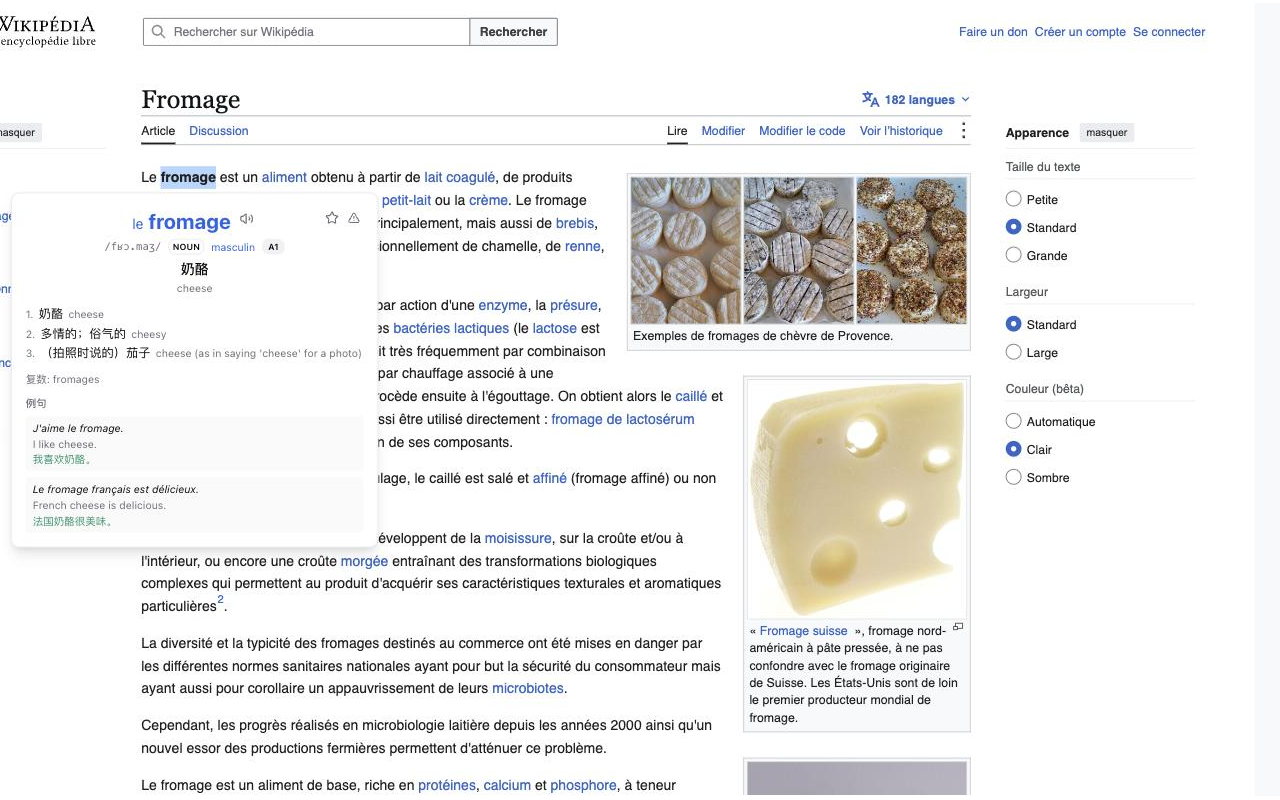
Set it up in three steps
- Open HiTCF French Word Cards on the Chrome Web Store and click Add to Chrome.
- Sign in to hitcf.com in the same browser. The extension uses the site's sign-in, so there is no separate password. No account yet? Create one — a free account is enough.
- Open any French page and double-click a word.
What's on the card
- Meaning in English, Chinese or French, with IPA, part of speech, gender and CEFR level. Switch the language in the extension's popup.
- Audio: tap the speaker to hear the word.
- Conjugation: the full table for verbs, every form with its own audio, plus a quick self-test.
- Inflected forms traced back: double-click obtenue and the card tells you it is the past participle of obtenir.
- Feminine and plural forms, word family, and what an abbreviation stands for.
- Examples, where every word is clickable in turn.
Once you have looked a word up, the extension remembers it locally, so the second time it opens instantly. A rarer word may need its card generated the first time, which can take a few tens of seconds.
Save it to your word list
Tap the star at the top right of the card and the word goes into your HiTCF word list — together with the sentence you met it in.
The extension, the website and the iOS app share one account and one word list: a word you save while reading the news in the afternoon is there when you open HiTCF to review in the evening. Seeing the original sentence again makes it far easier to remember than a word on its own.
Good to know
- Daily limit: a free account gets 100 lookups a day; members have no cap. Click the HiTCF icon in the toolbar to see today's count.
- Per-site switch: if double-clicking means something else on a particular site, click the toolbar icon and turn off the switch for that site.
- Privacy: only the word you double-click and the sentence around it are sent to HiTCF, to fetch the card and tell homographs apart. The extension never reads your browsing history or records which sites you visit.
- Signed out: a double-click asks you to sign in to hitcf.com first; once you have, go back to the page and double-click again.
The HiTCF iOS beta and ChatGPT plugin are on the Apps page too — all three use the same account.